🔥 Backpack
Foundation Partner
Backpack is an exchange partner of Hummingbot Foundation, so when you use Hummingbot to run bots on Backpack, a portion of your fees goes to support the Foundation and our mission to democratize algo trading with open source software. To help support us, create an account using our Backpack referral link and enter that account's API keys into Hummingbot and run bots! Thanks for your help! 🙏
🛠 Connector Info
- Exchange Type: Centralized Exchange (CEX)
- Market Type: Central Limit Order Book (CLOB)
| Component | Status | V2 Strategies | Notes |
|---|---|---|---|
| 🔀 Spot Connector | ✅ | Yes | |
| 🔀 Perp Connector | ✅ | Yes |
ℹ️ Exchange Info
- Website: https://backpack.exchange
- Backpack referral link: https://backpack.exchange/join/1tvdqfkk
- CoinMarketCap: https://coinmarketcap.com/exchanges/backpack-exchange/
- CoinGecko: https://www.coingecko.com/en/exchanges/backpack-exchange
- Fees: https://support.backpack.exchange/exchange/trading/trading-fees
🔑 How to Connect
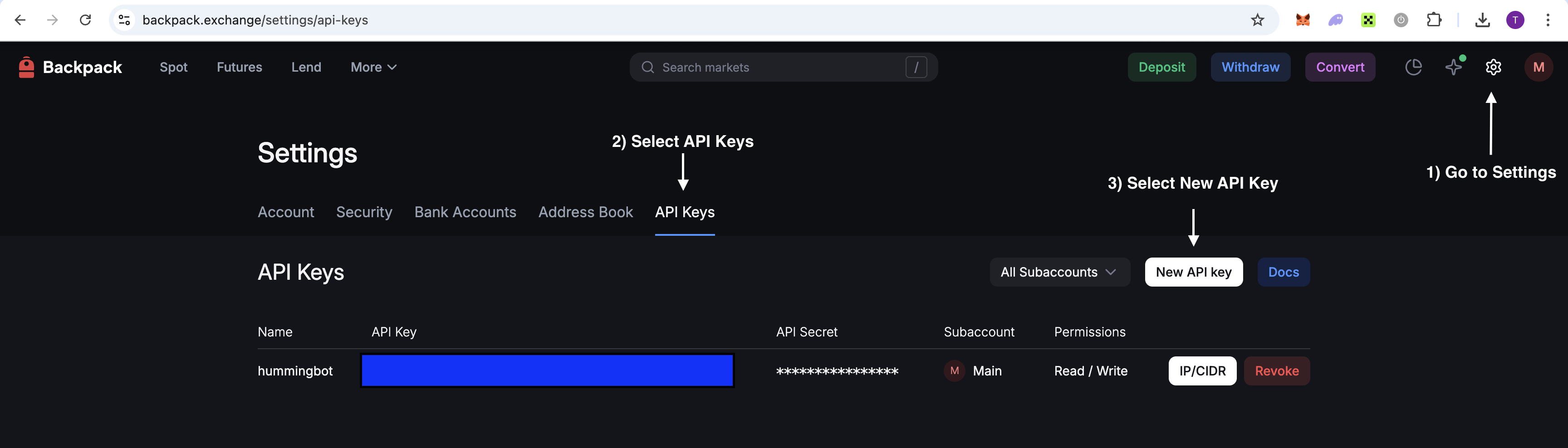
Generate API Keys
The same API keys can be used for both spot and perpetual trading on Backpack.
Step 1
Log in to your Backpack account and navigate to API Settings.
Step 2
Click Create New API Key.
Step 3
Configure your API key:
- Enter a label/name for your API key
- Enable the following permissions:
- Trading - Required for placing and managing orders
- Read - Required for accessing account and market data
Step 4
Complete the security verification (2FA if enabled).
Step 5
Your API Key and Secret Key will be displayed. Save both keys securely. The Secret Key is only shown once - if you lose it, you'll need to create a new API key.
Connecting to Hummingbot
From inside the Hummingbot client, run connect backpack:
If connection is successful:
🔀 Spot Connector
Integration to spot markets API endpoints
- ID:
backpack - Connection Type: WebSocket
- API Docs: https://docs.backpack.exchange/
- Github Folder
Order Types
This connector supports the following OrderType constants:
LIMITLIMIT_MAKERMARKET
🔀 Perp Connector
Integration to perpetual futures markets API endpoints
- ID:
backpack_perpetual - Connection Type: WebSocket
- Github Folder
Usage
From inside the Hummingbot client, run connect backpack_perpetual:
>>> connect backpack_perpetual

Enter your backpack_perpetual API key >>>
Enter your backpack_perpetual secret key >>>
If connection is successful:
Order Types
This connector supports the following OrderType constants:
LIMITLIMIT_MAKERMARKET
Position Modes
This connector supports the following position modes:
- One-way